
Adding a team member or employee to your business on Tyms Book is crucial for maintaining uninterrupted bookkeeping operations, even when the primary bookkeeper or accountant is unavailable. By doing so, you can delegate specific bookkeeping tasks and responsibilities while ensuring different levels of access based on your team members' roles.
On Tyms Book, you can grant access levels such as Admin, viewer, and editor, allowing you to customize permissions according to each team member's function.
Here is a brief guide on adding a team member to your business on your Tyms Book account.
Steps in adding a team member to your business:
-
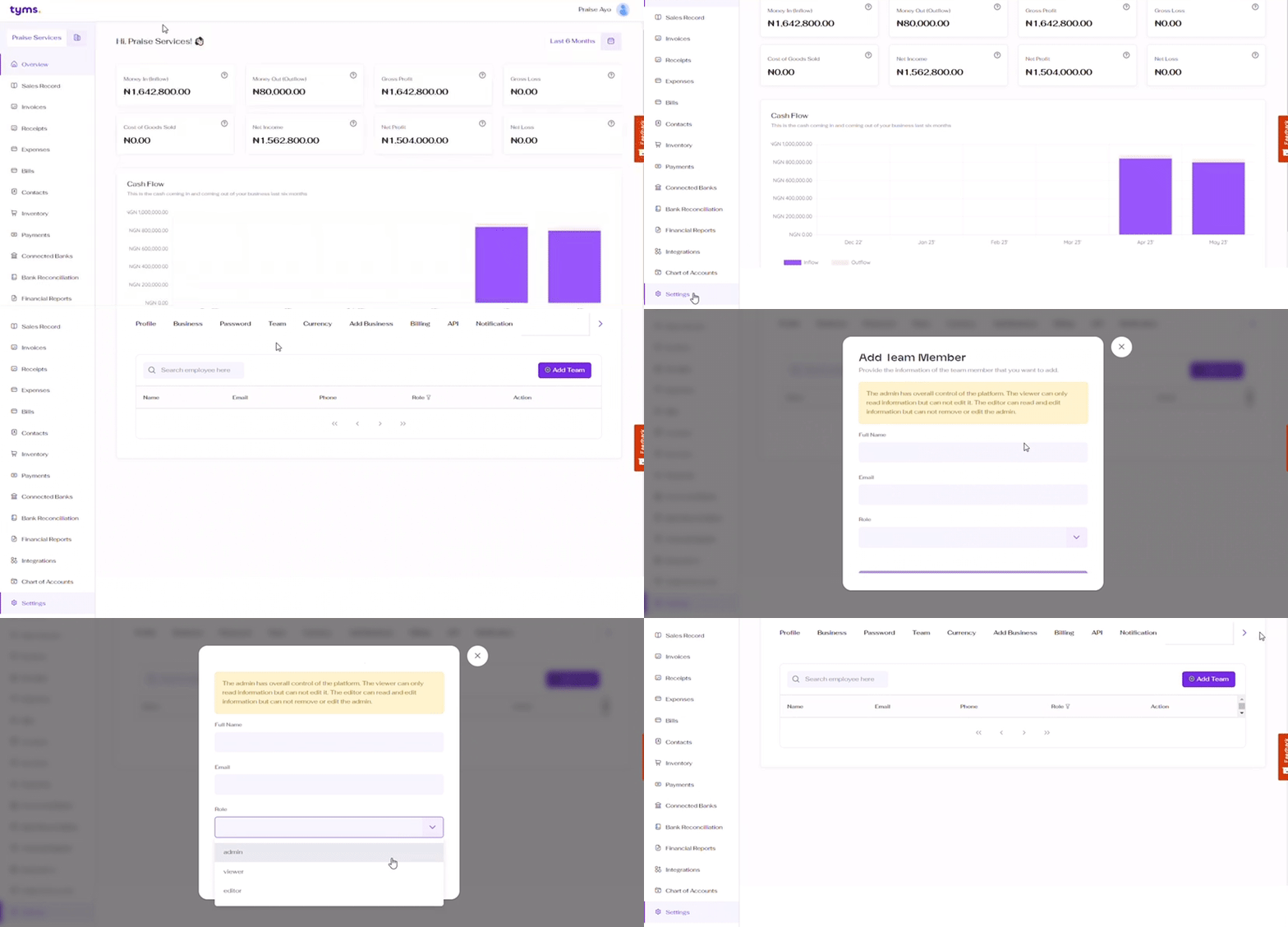
Begin by logging in to your Tyms Book account.
-
Click on https://mybook.tyms.africa/dashboard/settings/profile to go to the settings page.
-
Select the team section to switch to the team menu.
-
Click on the "Add team member" button and a form will be opened up to you to add the details of your team member.
-
You MUST enter the employee’s full name, consisting of first and last names.
-
You MUST also enter the team member’s email address which can also be used to log in by the employee.
-
You MUST assign a role to the team member which will determine the level of access to be granted to this employee. Example: The admin has overall control of the platform. The viewer can only read information but can not edit it. The editor can read and edit information but not remove or edit the admin.
Click on the “Save Member” button and your team member would be saved with all the information entered.
Tyms Approval Workflow Priority Rules: What Every Admin Should Know
Dernière mise à jour par Tyms 1 year ago
How to integrate Paystack on Tyms for invoice payment collection
Dernière mise à jour par Praise Arannilewa 3 years ago
General overview of Tyms AI Agent (Adam) for Generative AI Powered Accounting Software
Dernière mise à jour par Ibrahim Adepoju 1 year ago
Update to Tyms pricing plans 2024
Dernière mise à jour par Tyms 2 years ago
How to register and login to your account on Tyms
Dernière mise à jour par Tyms 1 year ago
How to Import Fixed Assets in Bulk on Tyms
Dernière mise à jour par Tyms 1 year ago
Why Your Book and Bank Balances Don't Match and How to Fix It
Dernière mise à jour par Tyms 1 year ago
How to create a Purchase Order on Tyms
Dernière mise à jour par Tyms 1 year ago