
The bank rule feature on Tyms is an automated system of posting transactions gottten via bank uploads or automatic bank sync through email forwarding. Bank rules are essentially a set of predetermined conditions through which the system checks for matches.
When a match is found, the system then posts the relevant information to a chosen destination and chart of accounts.
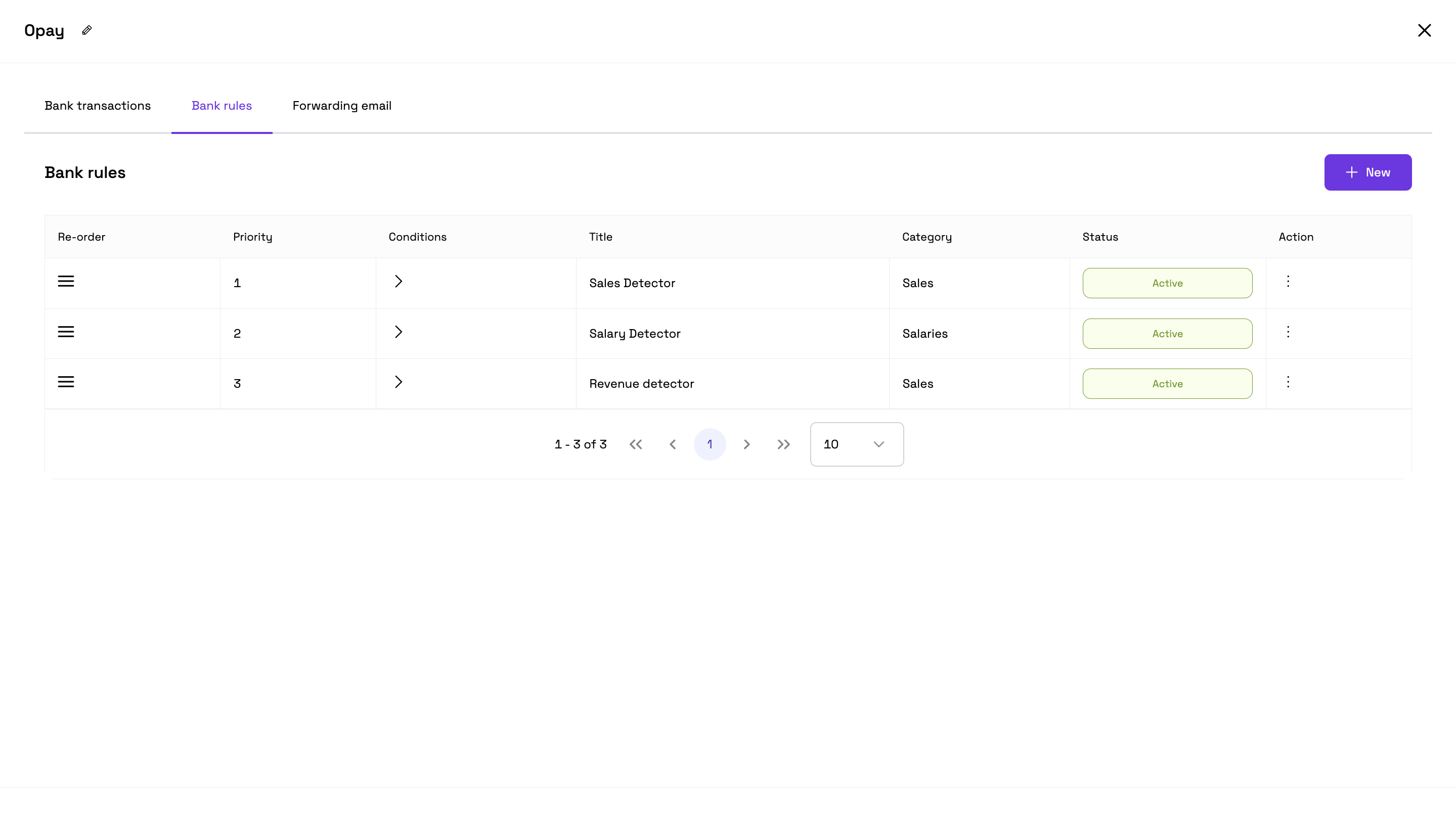
The bank rule section includes various terms that are relevant. Here is what they stand for:
Priority: This implies the order in which the bank rules should be executed if a bank statement matches more than one rule. Ex: If priority is 1 for a rule, and 2 for another, the former would be applied to the bank rule.
Conditions: The circumstances for the bank statement to fulfill in order for it to satisfy the bank rule. Ex: If narration contains "Data", post to expenses. The condition to be fulfilled is "Narration contains data".
Rule title: The title of the bank rule; which would be used to identify the set of conditions you'll create. Ex: Salary Detector.
Destination: The section of the application the statement should be posted to if it satisfies the bank rule. Destinations include Sales, Expenses, Journal record, Asset Record.
Category: The Chart of Account for which that statement or transaction should be categorized under from the ones you've created or already existing. Ex: Rent (under Expenses), Subscription revenue (under Sales).
Status: Condition or state of the bank rule; active or inactive.
How to Set Up Composite Items and Raw Materials on Tyms
Dernière mise à jour par Tyms 7 months ago
How to Set the Priority Column When Uploading a Bank Statement
Dernière mise à jour par Tyms 10 months ago
How to create a sales link on Tyms web application
Dernière mise à jour par Praise Arannilewa 3 years ago
How to record inflow on Tyms
Dernière mise à jour par Praise Arannilewa 2 years ago
Getting Started with Fixed Assets
Dernière mise à jour par Tyms 1 year ago
How to Access Point of Sales (POS) as a Team Member in Tyms
Dernière mise à jour par Tyms 1 year ago
How to create a Recurring Journal Entry on the Tyms Accounting Software
Dernière mise à jour par Tyms 1 year ago
Automate Your Billing: Managing Recurring Bills on Tyms
Dernière mise à jour par Tyms 1 year ago